AM62Px Temperature and Power Environmental Stresstesting Results
The MitySOM-AM62Px (62P54-TX-XAD-RI) SOM was placed in the MitySOM-AM62 Development Kit and loaded into the environmental chamber with the following configuration:
- Industrial Temperature micro-SD used for boot media and reference filesystem
- Industrial Temperature USB stick loaded into one of the USB 2.0 HUB positions
- ETH0 port connected to an internal network at 1 Gbps link rates.
- Micro-USB console port connected to external PC for console monitoring.
- Attach active heat sink FJ23 23mm BGA 5V Fansink with stick-on-pad
Stress Test software was enabled on the MitySOM-AM62Px to perform the following operations (continuously) during test:
- Running the "memtest" application on 256 MB of DDR4 memory
- Running nandtest continuously on the MitySOM-AM62 OSPI NOR partitions
- Running stress-drive tests on a micro-SD card partition.
- Running a stats collection script which gathers CPU temperature, power / current draw, and CPU utilization
- Running iperf on eth0
Note: the OLDI interface was not run during this test. Running the OLDI interface will draw additional power in order to drive the LVDS output links.
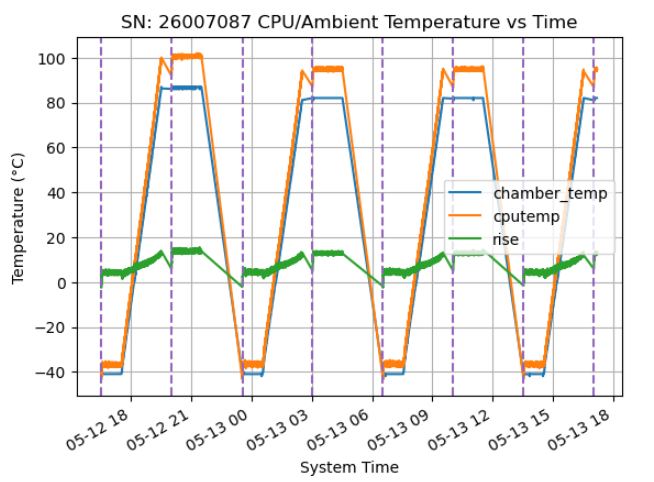
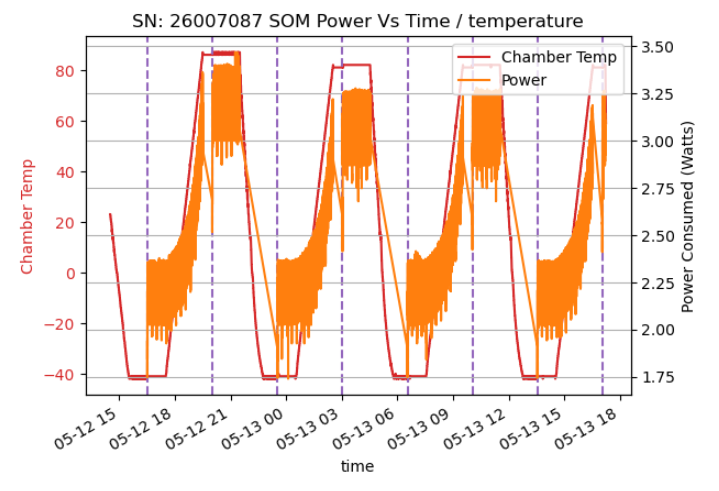
The system was allowed to run while the environmental chamber ranged from -45C to +85C, including soaks at each end of the range.
The figures below show the temperature of the AM62Px (die temperature as reported by the kernel software), the chamber, the computed temperature rise, and the power consumed by the SOM.
Idle testing with Passive Heatsink Attatchment
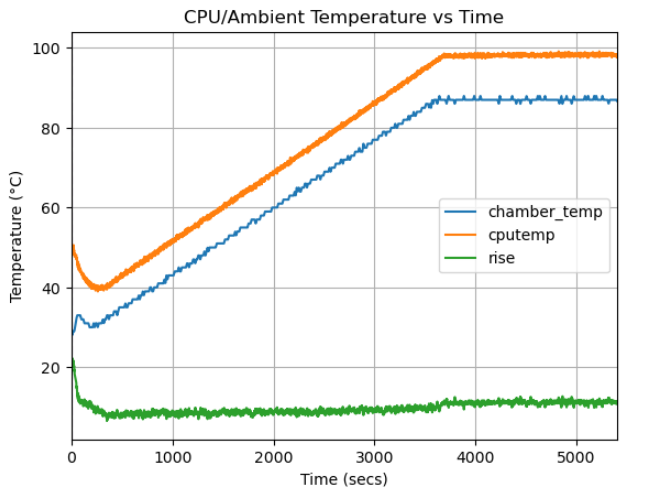
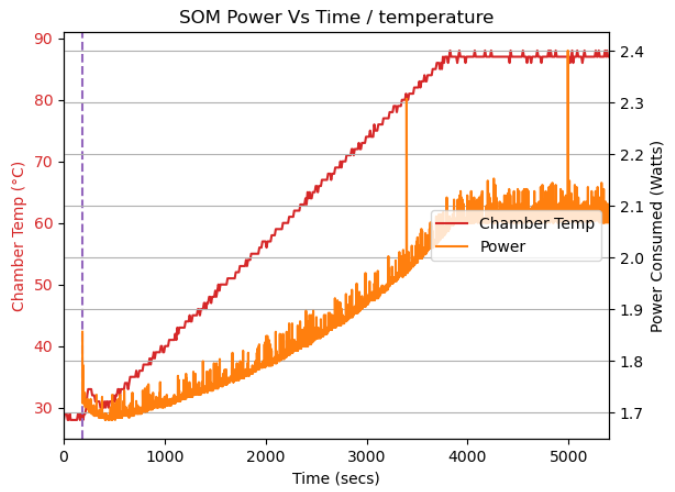
In this case, the ATS-52150G-C1-R0 passive heatsink was attached and the system was booted to Linux and no additional software was run (beyond the data logging software) while the chamber was ramped from room temperature to +85C. From the figures, the power consumption of the SOM is much lower, and the unit was able to run at temperatures up to 85C ambient. From our test, we were able to achieve a maximum on-die temperature of 99.32 C with a maximum power consumption of 2.4 W.